What is Verie?
Verie is a browser-based photo-effects and editing service for portraits, everyday images, cover art and visual experiments. It combines an effect catalog, saved visual recipes called Skills and an AI workspace for image creation and follow-up edits. A separate free Photo Editor handles basic brightness, contrast and saturation changes. AINavly lists Verie as Freemium because browsing and simple adjustments differ from account-based AI generation.
What you can do
- Y2K, VHS, glitch and vintage-grain photo effects
- Saved visual recipes called Skills
- Conversational image-to-image and text-to-image workflows
- Free browser brightness, contrast and saturation controls
- Image versions and downloads described by the product
How to get started
- Choose whether you need a small light-and-color correction or an AI-generated treatment.
- For a style change, compare the published examples and choose one Skill.
- Use a photo you have permission to edit and note details you want to preserve.
- If using AI, sign in and check eligibility, balance and the current generation quote.
- Compare the output with the original, especially faces, lettering and object edges.
- Inspect the saved file before sharing; further AI generations can consume additional credits.
Choose a visual treatment before generating
Verie organizes its effects around recognizable looks such as Y2K digicam color, VHS-inspired scan lines, RGB glitch and vintage print grain. Use the published before-and-after pairs to understand what each look changes. The homepage distinguishes these example inputs and outputs from decorative gallery artwork. A softer color mood and a heavy distortion solve different creative tasks; decide which suits the source image before spending credits.
What a Skill means in Verie
A Skill is a saved visual recipe with a starting treatment, supported image inputs and available options. It reduces the amount of prompting needed to begin an effect. The public Y2K page links to Soft Haze, Dreamcore Grain and Soft Color variations, each with a different direction. It is a starting configuration rather than a promise that every source photo will match the example. Review the selected recipe and credit quote before running it.
Free light-and-color editing is a separate workflow
The public Photo Editor page provides brightness, contrast and saturation controls. It describes browser-side processing, no sign-in and PNG downloads without generation credits. Its listed input limits are JPEG, PNG or static WebP, up to 10 MB and 16 megapixels. These sliders affect the whole picture; they are not selective masking, object removal or a new background. Moving into AI editing requires a separate workspace upload. We inspected the empty editor without supplying a file.
AI editing, conversation and image versions
For a substantial restyle or a new image, the AI workspace offers image-to-image and text-to-image creation. The product describes continuing with a follow-up instruction, reviewing versions and downloading a preferred result. Start with one main change and identify the details that matter: a person’s pose, a product outline or a readable label. AI can change those details despite preservation instructions. Compare the original and output at full size before choosing a version; we did not test a conversation or generated image.
Freemium access and credit estimates
The homepage currently describes 100 starter credits for eligible new accounts, with sign-in required. An allowance is not a guaranteed number of images: effects, models and settings can have different costs. The inspected Y2K page displayed an estimate of 50 credits per run, which is an example quote rather than a universal price. The pricing page offers recurring subscriptions and one-time credit purchases with different validity rules. Check eligibility, billing period, renewal terms and the active quote before confirming a paid action. No account, credit claim or purchase was tested.
Photos, privacy and sharing links
The free adjustment page describes local browser processing. The AI workspace is different: its privacy policy says prompts, input images and settings go to the processing services used for the selected workflow. Uploading or generating does not automatically publish a photo to the public gallery. However, the policy also warns that accessible file URLs can allow another person to view an image, and deleting a conversation does not confirm removal of every related file or backup. Review these distinctions before uploading private photos. We did not audit retention or provider practices.
What AINavly checked
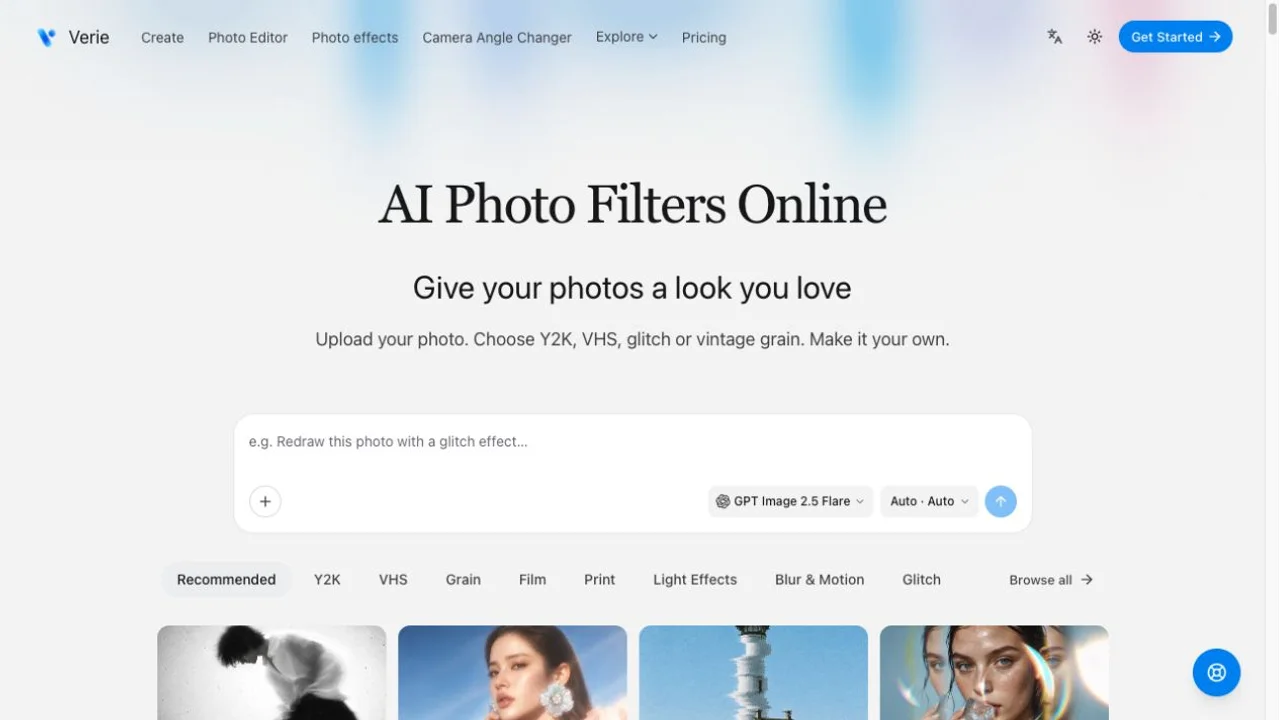
On October 25, 2026, we opened the public homepage, followed its Y2K Digicam link and inspected the effect page’s sample descriptions, sign-in link and credit estimate. We also opened the free Photo Editor and observed its empty input area, disabled adjustment sliders and PNG-download control. The article screenshot records the official homepage, not an output generated by AINavly. No personal photo was uploaded, no account was used, and AI output quality, version history and downloads remain untested.
Who it suits
People exploring a photo style, a cover-image concept or a small image adjustment in a browser.
Before you start
AI effects may alter faces, lettering and object shapes. Check the generation quote, original image and file-sharing privacy before using a result.
Common questions
What is Verie?
Verie is an online photo-effects and editing service combining style recipes called Skills, credit-based AI image creation and a separate free light-and-color editor.
Is Verie free or freemium?
It is Freemium. Public style browsing and the browser brightness, contrast and saturation editor are free. AI generation requires sign-in and credits; starter offers and paid plans have their own terms.
What is a Skill in Verie?
It is a saved visual recipe that supplies a starting look, supported inputs and available settings for a photo effect. Results still depend on the source image and selected version.
Which photo effects does Verie offer?
The reviewed public catalog included Y2K, VHS, glitch, grain and other style categories. We inspected the Y2K effect page and its linked variations, without generating a result.
Can the VHS filter edit a video?
The reviewed VHS offering is a still-photo treatment with tape-inspired visual texture. This listing does not establish video filtering or animation support.
Do simple photo adjustments use AI credits?
The standalone Photo Editor says brightness, contrast and saturation changes do not use generation credits and can be downloaded as a PNG. AI restyling in the workspace is a separate credit-based action.
How many free AI images do starter credits provide?
There is no fixed count. The current homepage lists 100 credits for eligible new accounts, while generation cost depends on the selected action. Inspect your balance and the active estimate before submitting.
Are my photos automatically posted publicly?
The privacy policy says uploads and generated results do not automatically enter the public gallery. It separately warns that someone with an accessible image file URL may view it, so do not treat that as a complete privacy guarantee.
What did AINavly test?
We inspected the public homepage, Y2K effect details, its sign-in/credit requirements and the empty free Photo Editor. No image upload, generation, sign-in, credit claim, payment, saved-version flow or download was tested.
Sources and review scope
- Project website ↗
- Y2K effect details and current quote ↗
- Free Photo Editor and file limits ↗
- Plans and credit purchases ↗
- Privacy and image-link handling ↗
Public homepage, Y2K effect and empty Photo Editor inspected. No personal upload, AI generation, sign-in, payment, download or provider/privacy audit.