What is Browlens?
Browlens is an AI brow app for exploring eyebrow placement, shape and visual styling in a browser. Its editor combines automatic landmark detection, six-point brow mapping, manual adjustments and a left-right balance report. A separate AI eyebrow-filter workflow previews a selected style on a portrait. The useful distinction is between free mapping and analysis, which can be explored without signing in, and account-based AI generation with credit and export requirements.
What you can do
- Six-point brow mapping
- Bilateral or side-specific shape adjustments
- Arch-height and length difference report
- Six eyebrow-style filter categories
- Free analysis with a separate AI preview workflow
How to get started
- Try an official sample or choose a permitted, front-facing portrait with both brows visible.
- Inspect the head, arch and tail guides and correct placement where necessary.
- Choose Both, Left or Right and change one shape control at a time.
- Read the balance report in photo pixels and compare it with the original view.
- Confirm placement, then explore a few style categories.
- Before AI generation or download, check sign-in, credits and plan requirements.
What Browlens does before generating an image
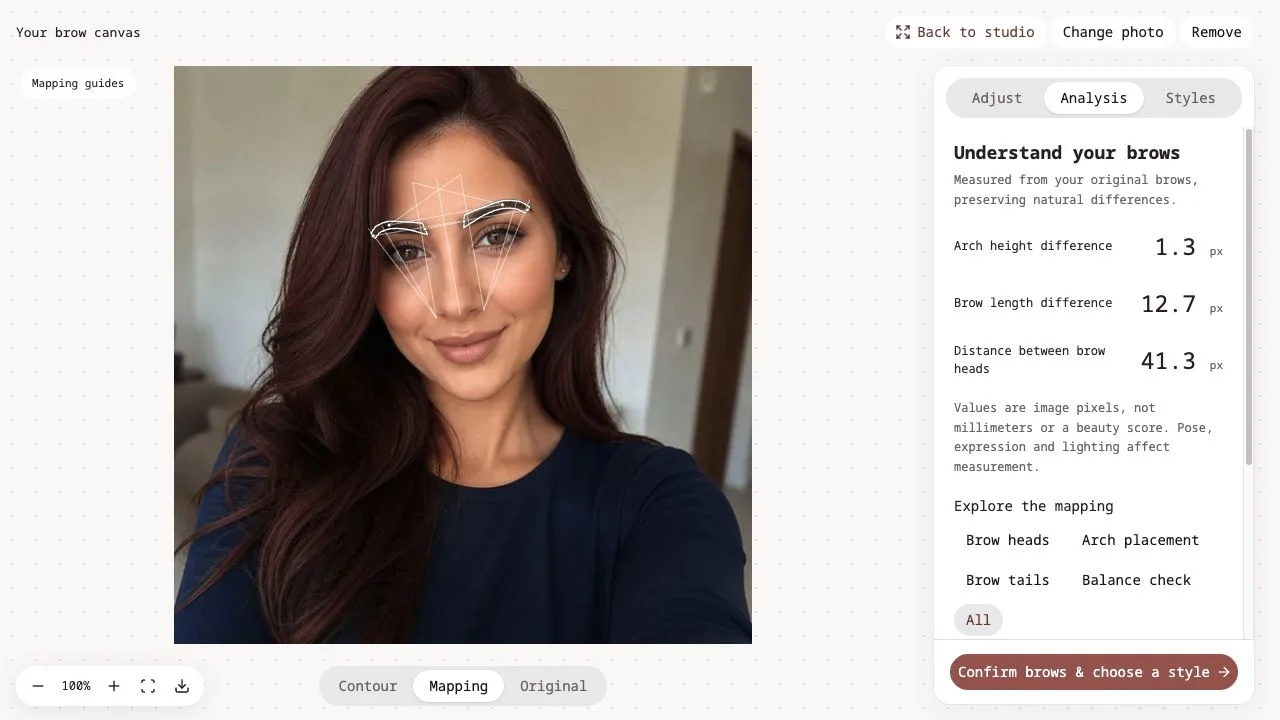
The mapping stage identifies a head, arch and tail for each eyebrow. Six control points let you correct the starting placement rather than accept every automatic landmark. The interface separates geometry from a generated photograph: mapping describes position, while an AI preview adds a styled appearance. Begin by checking the outline against the actual brow edges before judging a different look.
Our sample-photo check
On October 25, 2026, we opened a photo supplied by the official website without signing in or uploading a personal portrait. The face-analysis model loaded, then the editor displayed mapping guides and Adjust, Analysis and Styles panels. We changed Brow thickness from 100% to 110%, expanded Fine-tune placement and confirmed the contour to open the style library. The analysis panel reported arch-height difference, brow-length difference and distance between brow heads. We did not drag every anchor, generate an AI result or complete an export.
Editing controls and eyebrow styles
The inspected controls included Both, Left and Right adjustment targets, thickness, arch height, length, vertical position, spacing and tail angle. Natural, Soft and Lifted appeared as brow-direction choices; these are separate from the try-on library’s style categories. After confirming placement, the library offered Natural, Arched, Straight, Soft Angled, Feathered and Defined filters, with multiple samples. Compare a small number of looks against the same source photo instead of changing the photo and style together.
How to interpret the brow balance report
The numbers describe distances in the photograph’s pixels, not millimeters on a face. Pose, crop, expression and lighting can change the measurement. The report explicitly avoids a beauty score. Use an arch-height or length difference as a prompt to inspect the image, not a reason to make both brows identical. Keep the original view available and compare the whole face as well as the enlarged outline.
Freemium pricing: free analysis, credit-based previews
The pricing page lists unlimited mapping, manual six-point editing and analysis reports on the free tier. AI photo generation is a separate step requiring sign-in and credits, currently two credits per generation. The free plan excludes downloads; paid plans and credit top-ups include watermark-free HD single-image export, while comparison export is listed for Premium. All in-app previews are described as watermarked. Check the current account entitlement and credit cost before generating or buying; we did not test checkout or downloads.
Photo requirements and privacy distinctions
The upload interface accepts JPG, PNG and WebP up to 15 MB and recommends a clear, evenly lit, front-facing portrait with visible brows. Only use a photo you have permission to edit. The privacy policy says AI Studio photos are processed by external model partners, with source photos removed from active processing within 24 hours of generation and generated previews kept in account history until deletion. Those are the operator’s stated terms, not a verified deletion or security audit. Do not assume the paid generation flow has the same data handling as an anonymous mapping session.
Use an eyebrow preview as a visual reference
A useful first goal is specific: compare a softer arch, a shorter tail or a slightly different thickness. Keep the source photograph constant, adjust one setting at a time and record what you prefer. An AI preview can help explain a styling idea, but it does not guarantee how brow hair, makeup or a salon service will look. Browlens also states that it does not automatically label your face shape. Its guides and reports support your choice rather than deciding an ideal appearance for you.
Who it suits
People comparing eyebrow placement and styling ideas in a portrait.
Before you start
Freemium: free mapping and analysis do not imply free AI generation or downloads. Pixel differences and generated previews are visual references, not an objective beauty rating or a guaranteed styling result.
Common questions
What is Browlens?
Browlens is a browser-based AI brow app with six-point eyebrow mapping, shape adjustments, a balance report and an additional AI photo-preview workflow.
Is Browlens free or freemium?
It is Freemium. Mapping, manual six-point editing and analysis are free without sign-up. AI generation requires an account and credits; download access depends on the plan or top-up entitlement.
What are the six brow mapping points?
They mark the head, arch and tail of the left and right eyebrows. Automatic placement is a starting point that can be corrected manually.
What does the brow balance report measure?
The inspected report displayed arch-height difference, brow-length difference and distance between brow heads. Values are photo pixels, not physical millimeters or a beauty rating.
Which eyebrow filter styles are available?
The inspected library included Natural, Arched, Straight, Soft Angled, Feathered and Defined categories. We opened the collection but did not generate a styled AI image.
Can I download the free analysis or AI preview?
The pricing page excludes downloads from the free plan. It lists watermark-free HD single-image downloads with paid plans and top-ups, and comparison exports with Premium. We observed Upgrade to export controls but did not test an export.
Does Browlens detect my face shape?
The homepage says it does not label face shape automatically. Its face-shape guide is a starting reference for comparing brow outlines rather than an automatic classification.
What did AINavly actually test?
We used an official sample photo, opened the mapping editor and analysis, changed thickness to 110%, expanded placement controls and opened the style collection. No personal photo, login, payment, AI generation or export was tested.
Sources and review scope
Tested official sample loading, mapping/analysis panels, 100%→110% thickness change, placement controls and style collection. No personal upload, manual-anchor accuracy benchmark, generation, login, payment or export.