What is dooo0t (Paper Dots)?
Searches for “dooot page dev” and “doooot page dev” can refer to the same photo-effects workspace at doooot.pages.dev. The loaded document is titled Paper Dots, while the visible brand is styled dooo0t, using a zero before the final t. The tool combines an image with a decorative dot treatment and an adjustable layout. AINavly includes it as a small design project with a browser entry and a separately linked iPhone app.
What you can do
- Four main-image layout positions
- Solid, striped or photo backgrounds
- Circle, square, star, drop, snowflake and character shapes
- Dot size, variation, count and placement controls
How to get started
- Open https://doooot.pages.dev/ and confirm the Paper Dots workspace.
- Read the three panel labels: Layout, Background and Dots.
- Choose an image you own or have permission to edit if you decide to use Upload.
- Select a simple composition and dot shape before adjusting size or count.
- Preview changes at the size where the image will be displayed.
- Use Download when enabled and inspect the saved file; export quality was not verified in this review.
The exact website behind both search spellings
The destination covered here is https://doooot.pages.dev/. “Dooot page dev” has one fewer letter o than the deployed hostname; “doooot page dev” is a spaced search phrase for that destination. Neither phrase is a separate product name. The workspace uses the Paper Dots document title and a dooo0t wordmark. If a creator page is shown first, the return link leads back to the image workspace.
Three panels organize the web workflow
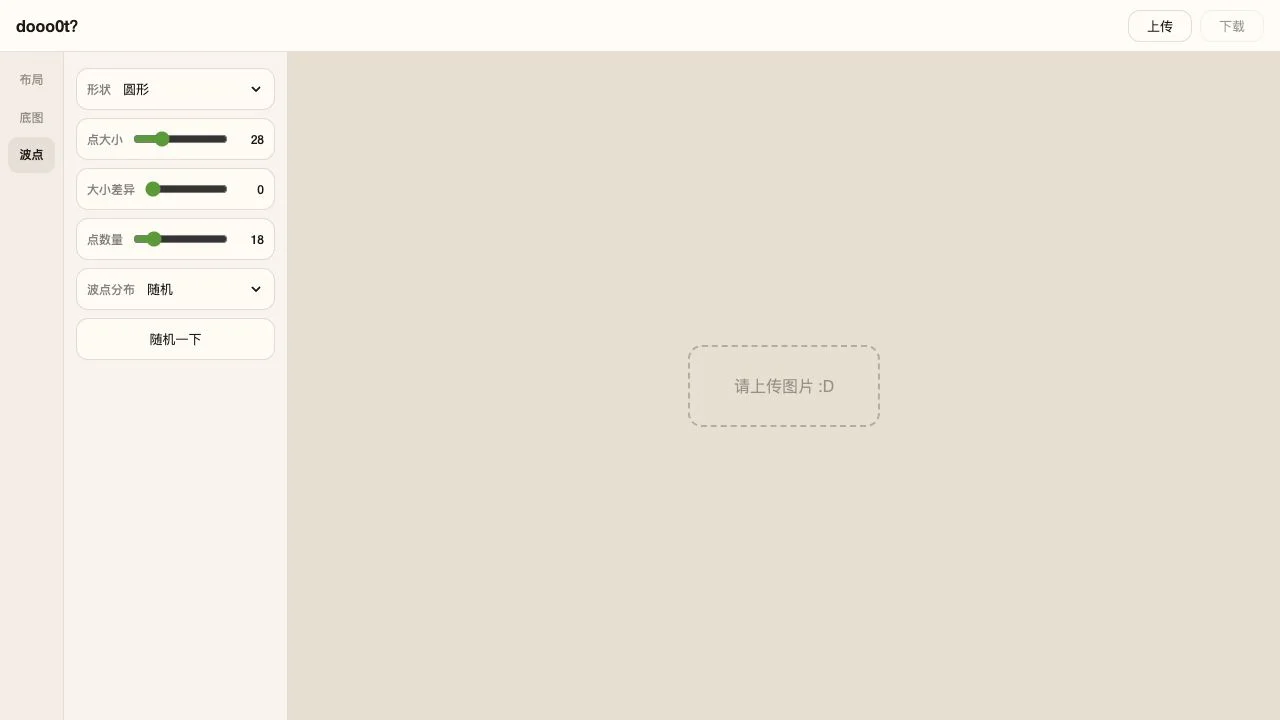
The Chinese interface groups settings into 布局 (Layout), 底图 (Background) and 波点 (Dots). Layout provides a main-image position selector with left, right, top and bottom choices, plus an allocation slider. Background offers a solid color, stripes or a photo. Dots supplies shape and distribution controls. Upload is the input step; Download was disabled while no image was loaded. These are observed controls, not a completed image-export test.
Dot shapes and composition controls
The shape menu lists circles, squares, stars, water drops, snowflakes and characters. Separate sliders control dot size, size variation and count. Distribution includes a random mode and two click-placement modes, distinguished by whether placements correspond across the composition. A randomize button is also present. Start with a simple shape and low visual complexity so that the effect supports the source picture instead of overwhelming it.
What the background controls reveal
During our browser review, selecting stripes exposed a second color and a stripe-width slider. The layout and dot panels also opened normally before an image was supplied. This confirms the controls are available, but not how every setting renders in a finished composition. Choose a background with enough contrast to reveal the dot treatment, then check the image at its intended display size before sharing.
Web editor and iPhone app have different scopes
The website displays an app announcement and links to dooo0t on the App Store. That listing describes a broader visual-creation app with compositional tools and reusable styles. Treat native features and the announcement’s Live Photo claim as app-specific information: they do not establish Live Photo export, a community feed or all native templates in this web editor. We did not install or test the app.
Review limits, access and image handling
We inspected the public workspace without sign-in or payment, switched among its panels and selected the stripe background. No personal photos were supplied, and no output, download, mobile workflow or network handling of images was tested. Do not infer a complete privacy guarantee from the absence of a login screen. Use an image you have permission to edit and retain the original separately. The product icon shown here is the original icon of the app linked by the website; the web document supplied no usable favicon.
Who it suits
People planning a decorative photo composition with a small visual tool.
Before you start
Chinese web interface. Settings inspected without uploading a photo or exporting; native app features, output quality and image-handling privacy were not verified.
Common questions
What is dooot page dev?
It is a search spelling used here for the Paper Dots photo-effects workspace at https://doooot.pages.dev/. The shortened spelling is not a separate application.
Is doooot page dev the same website?
This guide covers doooot.pages.dev, whose document title is Paper Dots and whose on-page brand is styled dooo0t. Both target search phrases refer to that linked workspace.
What does Paper Dots do?
Its web interface provides image layout, decorative dot shapes, backgrounds and placement settings, with Upload and Download controls. We inspected the settings without generating a finished image.
How do I read the Chinese tabs?
布局 means Layout, 底图 means Background and 波点 means Dots. 上传 is Upload and 下载 is Download.
Does the browser version create Live Photos?
The site advertises Live Photo capability in its iPhone app announcement. We did not verify that capability in the web editor; native-app features should not be assumed to exist on the website.
Why is Download disabled?
It was disabled in the inspected empty workspace, which prompted us to upload an image. We did not test what happens after supplying one or verify a successful export.
Where did the product icon come from?
The web document did not declare a usable favicon. This listing uses the unchanged official App Store icon of dooo0t, the native app linked by the website.
Sources and review scope
Verified tab navigation and stripe controls without an image upload, export, app install or network/privacy audit.