
What is City Roads — Anvaka?
The search phrase “anvaka github io city roads” refers to City Roads, an open-source project by Andrei Kashcha, known as Anvaka. The application at anvaka.github.io/city-roads draws a selected city’s road network as a minimal line map. AINavly includes it in Maps & Live Data for exploring urban structure and producing a visual map, rather than for route planning or real-time traffic information.
What you can do
- City-name and boundary selection
- OpenStreetMap road-network rendering with WebGL
- Road, background and label color controls
- PNG raster and SVG vector export options
- Open-source code and documented scene API
How to get started
- Open the official City Roads page and enter a city with its country or region.
- Choose Find City Bounds and inspect the returned geographic areas.
- Select a city-sized boundary and wait for its roads to load.
- Check the extent and visible attribution before comparing the network.
- Open Customize to inspect line, background and label colors.
- Choose PNG or SVG for your intended use, then inspect the saved output; exports were not tested in this review.
From a city name to a selected boundary
Start by entering a place name and choosing Find City Bounds. The results represent geographic areas; similarly named or overlapping administrative boundaries can produce different extents. In our test, Paris, France returned several entries and we selected one administrative result. The loaded address recorded areaId=3600007444. The selected boundary matters as much as the city name when you compare two maps.
OpenStreetMap data, name lookup and caching
The official README explains that city-name resolution uses Nominatim, while road data comes from OpenStreetMap through Overpass when it is not already in the project’s cache. The author describes a cache of roughly 3,000 larger cities to reduce downloads. These components have different roles: name search identifies the area, the data request obtains the road geometry, and WebGL draws it in your browser. An available map is not proof of a live or complete road survey.
What we verified with the Paris example
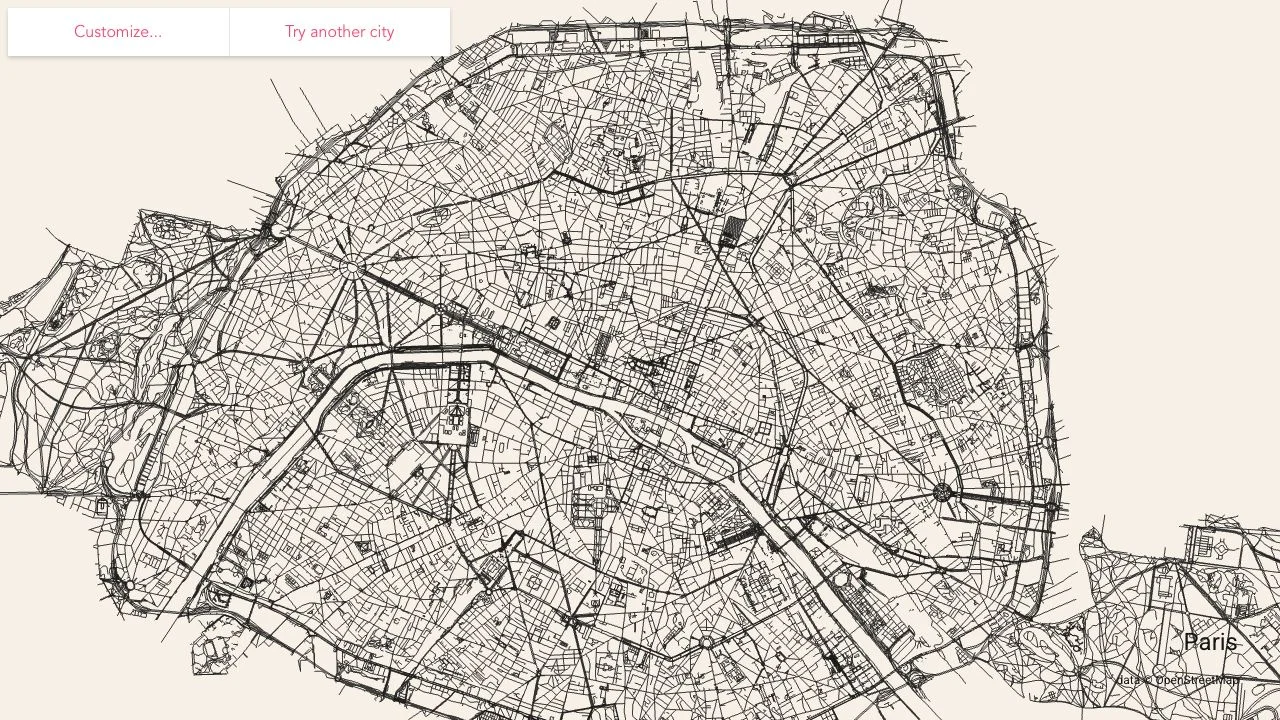
On October 25, 2026, we searched Paris, France, chose an administrative boundary and waited for the cached data to load. The application rendered a dense road network, displayed Paris as the label and retained OpenStreetMap attribution. Opening Customize revealed line, background and label color controls plus PNG and SVG export links. The screenshots record that actual session. We did not verify every road, compare boundary variants or complete a file-export test.
Custom appearance and raster versus vector output
The interface provides separate color controls for roads, background and labels. PNG is offered as a raster export of the current screen; SVG is offered as a vector export. Choose a view and contrast level before exporting rather than assuming a file will include an entire city at unlimited detail. Inspect the resulting file in the program where you will use it. Export controls and their implementation were inspected, but file dimensions, print quality and downstream editor compatibility were not tested.
Loading limits and large geographic areas
The project warns that rendering is constrained by browser and graphics-memory capacity. Its interface notes that large cities can require more than 200 MB of transfer, and the README warns that areas with millions of roads can crash a page. Overpass requests can also be slow or rate-limited. Begin with a city-sized boundary, allow the request to finish and avoid treating a stalled download as proof that the city has no roads.
Open source, attribution and developer extensions
The repository publishes the application code under the MIT license and documents a scene API for developer use. The road data has separate OpenStreetMap attribution and licensing requirements. Preserve the displayed data credit when preparing a shared visual, and consult the linked source information before adapting data or code for another project. A browser rendering, a software license and a dataset license are distinct parts of the workflow.
Who it suits
People exploring urban road patterns, minimal map visuals or an open-source geospatial project.
Before you start
Large areas can be slow or exceed browser memory. Data coverage and boundary selection affect the result. Preserve OpenStreetMap attribution; this is not a live navigation or traffic service.
Common questions
What is anvaka github io city roads?
It is a search phrase for Anvaka’s City Roads application at https://anvaka.github.io/city-roads/, which visualizes roads inside a selected geographic area.
Is City Roads free?
The inspected application loaded a city map without an account or payment. The source is published under MIT. Optional donations and merchandise links are separate from this browser-map workflow.
Where does City Roads get its roads?
The README describes OpenStreetMap road data, Nominatim name lookup and Overpass requests with a cache for many larger cities.
Can City Roads export PNG and SVG?
Both formats appear in the inspected Customize panel. PNG is described as a current-screen raster image and SVG as a current-screen vector image. We did not complete or inspect exported files.
Why do several results appear for one city?
Search can return different geographic areas or overlapping administrative boundaries. Check which extent you select rather than assuming every result represents the same city outline.
Why is a city slow to load?
The project documents service rate limits, large downloads and browser or video-memory constraints. Very broad areas can be much heavier than a city-sized selection.
Is this a navigation or live traffic app?
No. This listing concerns a road-network visualization. Routing, current traffic, Street View and official road-completeness guarantees were not established.
Sources and review scope
- Project website ↗
- Project README: data, cache and performance limits ↗
- Source implementation of customization and export ↗
- OpenStreetMap attribution and data information ↗
Verified Paris search, boundary selection, rendered road network and Customize/export controls. No output-file or print-quality test. User-requested directory illustration; not an official logo.