
Bali Fuel Watch: Website, Fuel Map & Trip Planning
Bali Fuel Watch is a free browser-based fuel map for Bali. It brings together station locations, anonymous driver reports and model estimates to help you investigate a possible fuel stop. Its strongest use is narrowing down options before a trip, while keeping a backup station and confirming the latest situation.
Open Bali Fuel Watch ↗- Project website
- balifuelwatch.vercel.app
- Access
- Free prototype
- Account
- Not needed for public viewing
- Region
- Bali, Indonesia
- App languages
- English / Bahasa Indonesia
- Affiliation
- Independent; not a Pertamina service
Independent guide. AINavly does not operate Bali Fuel Watch or verify its live fuel estimates.
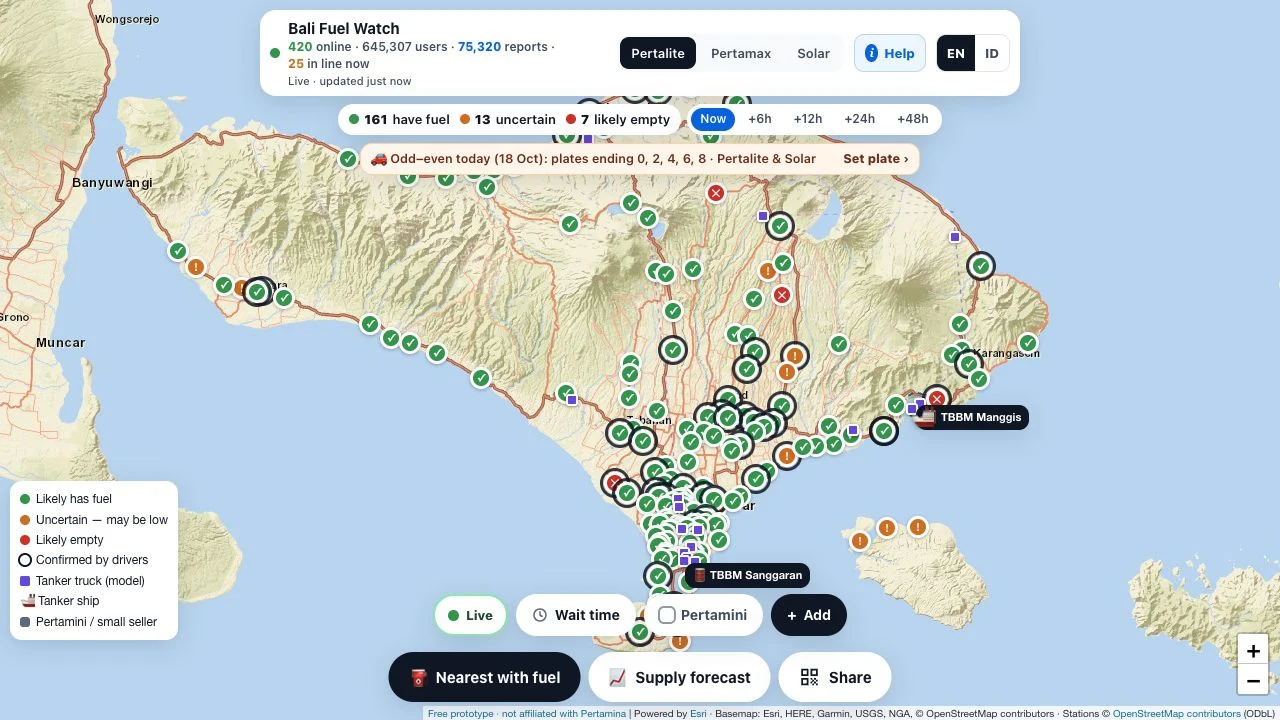
What is the Bali Fuel Watch website?
The project supplied for this guide is balifuelwatch.vercel.app. It is an independent prototype rather than a Pertamina service, booking system or fuel delivery platform. The visible fuel selectors are Pertalite, Pertamax and Solar; selecting the right fuel is the first step in making the map relevant to your vehicle.
A map pin provides a lead to investigate. It cannot establish that a particular pump will still have stock when you arrive, that you qualify for a subsidised purchase, or that the station is on a practical route.
How should you read the map before leaving?
Begin with the legend, then inspect a station rather than relying on the overall green count. The interface distinguishes likely availability, uncertainty, likely empty stations and recent driver confirmations. These labels express different kinds of evidence; they are not a single official inventory feed.
Compare the report time with the time you intend to arrive. A recent report may still become outdated during a busy period. Pick a second plausible station along your route before committing to a long detour.
How to use Bali Fuel Watch
- Open the project website and choose EN or ID for the interface.
- Choose Pertalite, Pertamax or Solar to match the fuel you need.
- Open a station pin and inspect its status, report recency and any wait information.
- Use the directions option only after checking the destination and a backup stop.
- Confirm current conditions through the station or official Pertamina channels before a costly detour.
What do +6h and +48h mean?
The Now view and the +6h, +12h, +24h and +48h controls serve different planning horizons. Future views should be read as scenarios generated by the app, not promised replenishment times. Truck and ship symbols also do not establish that a particular station has received fuel.
For an immediate journey, prioritize current information and direct confirmation. For a later journey, revisit the map closer to departure instead of saving a forecast screenshot as if it were a reservation.
Can it help with queues and nearby stations?
The interface offers a nearest-station action, a wait-time filter and an “I’m in line” workflow described in the help panel. The help says a queue check-in uses a location check and can contribute wait information. We inspected that explanation without performing a check-in.
Nearest by location is only one factor. Access roads, remaining fuel, report age and whether the correct fuel is sold can change which stop makes sense. Use the map while safely stopped, rather than interacting with it while driving.
Is Bali Fuel Watch official, safe or guaranteed?
The project explicitly disclaims affiliation with Pertamina and government authorities. It describes its availability and movement information as estimates and anonymous reports that may be wrong. A Vercel address and a working map do not independently validate those estimates.
Public browsing did not require a login or payment in our check. That observation is narrower than a security audit. Review any permission request before using location features, and do not add personal details to a public station report.
What if the map is not working?
First distinguish a page-loading problem from missing data: a visible interface with blank map tiles can have a different cause from an unreachable website. Check your connection, reload once and try a current browser. If a location action fails, inspect its permission state instead of assuming the station has no fuel.
When the page is unavailable or reports are stale, use a known station and official contact channels. Do not treat an empty screen, a missing pin or an old status as proof of a shortage.
What should you use alongside it?
Use a conventional map for route context and station access, and contact the operator for current supply or purchase conditions. These are complementary checks: navigation estimates the journey, the station confirms its situation, and Bali Fuel Watch adds a community-oriented overview.
For another example of a map that needs careful source reading, see our Ojo Panamá guide. It covers a different country and purpose; it is a comparison of information habits, not an alternative fuel service.
Frequently asked questions
What is the Bali Fuel Watch URL?
https://balifuelwatch.vercel.app/ is the project website inspected for this guide.
Is Bali Fuel Watch free?
The site calls itself a free prototype. We could open the map without payment or an account on October 18, 2026.
Does a green marker guarantee fuel?
No. The app distinguishes estimates from recent reports, and its disclaimer says information can be incomplete, outdated or wrong.
Does Bali Fuel Watch cover all of Indonesia?
The inspected interface focuses on Bali. We did not verify nationwide coverage.
Is it an official Pertamina app?
No. Its own disclaimer says it is independent and not affiliated with Pertamina or government authorities.
Can I read this guide in Indonesian?
Yes. Use the Bahasa Indonesia link on this page for the full Indonesian guide.
Sources and check scope
On October 18, 2026, we opened the public map, read its help and disclaimer, and switched between English and Indonesian. We did not share a location, submit reports, join a queue, or verify stock, waiting times, forecasts, or the displayed audience counters.