
Photonic lighting v6 0 byizul netlify app identifies a specific Netlify deployment. The interface names the product Photonic Mixer Pro v6.0 — BY IJUL and combines a 3D lighting preview with sequence, color and rig management controls. AINavly examines the distinction between features visible in the mixer, interactions confirmed in the browser and capabilities that still need validation before a production workflow.
Inside Photonic Mixer Pro v6.0
Identify the intended product
Use the supplied hostname to locate the deployment and the Photonic Mixer Pro v6.0 title to recognize the interface. The hostname uses byizul while the visible title says BY IJUL. We record those two strings without inferring a verified developer identity, commercial vendor or connection to another similarly named lighting product.
A mixer organized around a rendered scene
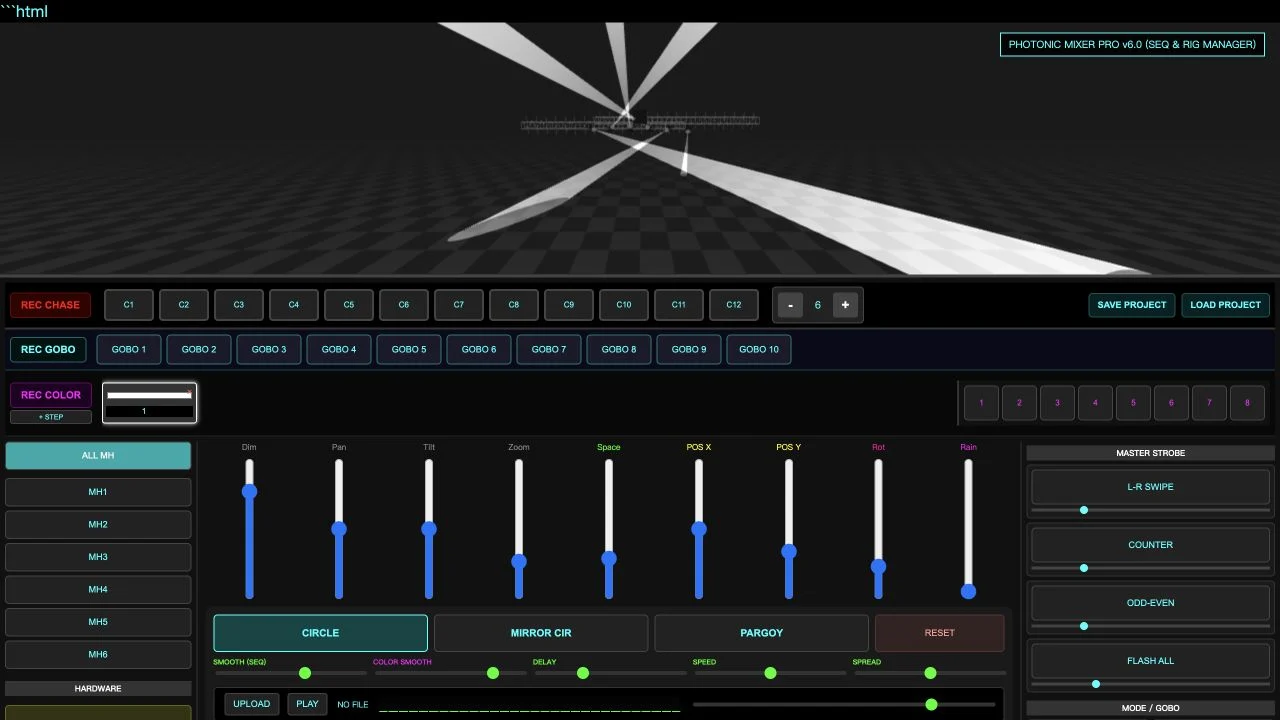
The preview rendered a checkerboard stage with beams and truss-like structures. Below it, controls are grouped into chase slots, GOBO slots, color steps, fixture selection, rigging and effects. The served HTML loads Three.js r128. This is evidence of a browser visualization interface; it does not itself establish a supported physical lighting protocol.
Interactions verified during the review
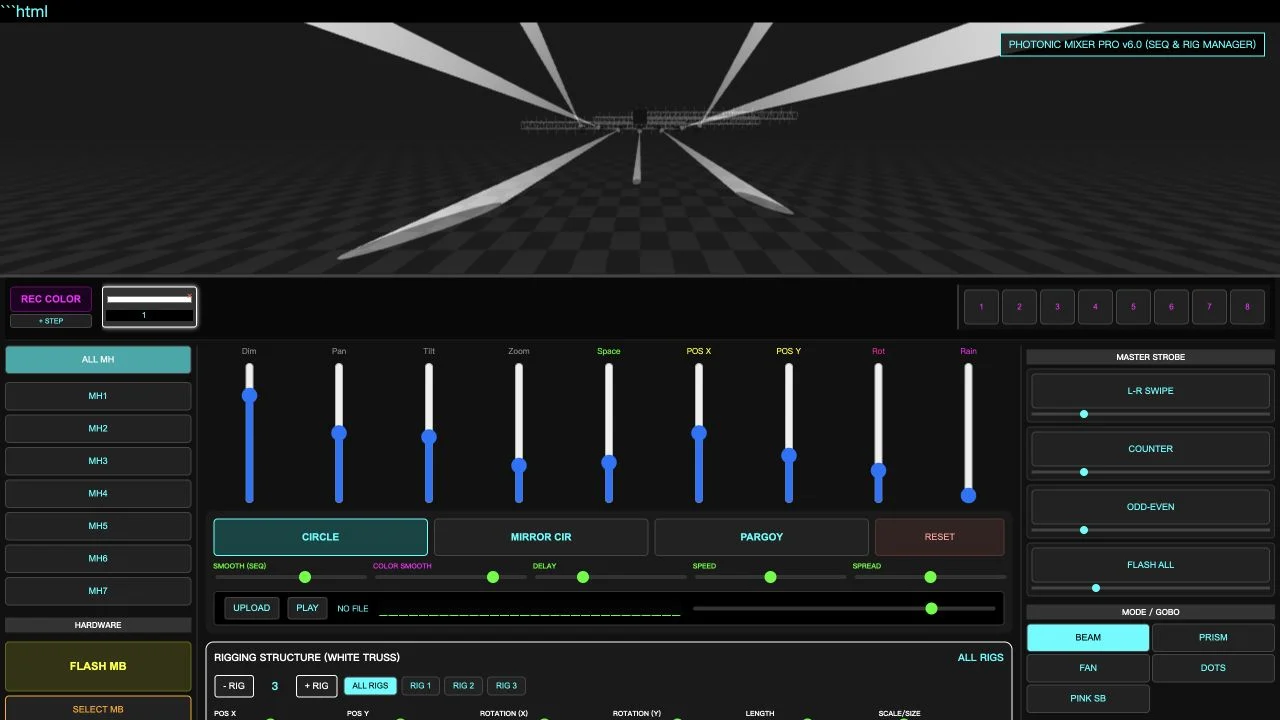
We selected CIRCLE and observed an active control and changing beams. Increasing the fixture count changed six to seven and added MH7. Increasing the rig count changed two to three and added RIG 3. A tilt slider also accepted a changed value, but the review does not treat that alone as a calibrated physical movement or a device-output test.
Visible controls versus completed workflows
REC CHASE, REC GOBO and REC COLOR are present with their associated slot areas. Dimmer, pan, tilt, zoom and spacing faders sit beside sequence smoothing, delay, speed and spread controls. Additional sections show master strobe modes and beam/gobo choices. We inspected those controls but did not validate every recording sequence, parameter combination or effect output.
What the project-file code shows
The delivered page defines a JSON export containing version, fixture count, arrangement values, effect state, chase collections and truss settings. Its loader reads a selected file and reconstructs parts of that state. That documents an intended local project workflow. We did not complete a verified round trip or establish that every current slider state and media asset is included; test the settings important to your use case.
Audio and hardware labels require separate checks
The UI has UPLOAD and PLAY controls and a HARDWARE area with FLASH MB and SELECT MB. These labels should not be expanded into unsupported claims about synchronization or real fixtures. No audio file was supplied and no external lighting hardware was connected. The tested workflow is the on-screen simulation, not verified DMX, Art-Net or USB control.
Assess suitability with a bounded task
For a concept sketch, check whether the preview makes the intended arrangement clear. For a repeatable sequence, test recording and restoration with a small project. For integration, look for explicit documentation and a verified connection path rather than relying on a hardware label. Public controls were accessible without payment or an account; full commercial terms and a software license were not established.
A first lighting-preview workflow
- Open the exact Netlify deployment and confirm the product title.
- Inspect the stage and identify the fixture, sequence and rig sections.
- Test one visible movement and a small count change.
- Validate project restoration separately if persistence matters.
- Require explicit compatibility evidence before assuming hardware or audio integration.
Who it suits
Creators comparing browser visualization utilities and people evaluating a lighting-concept or sequence-planning workflow.
What our check establishes
The review confirms limited browser interactions and inspects the delivered HTML. Complete chase recording, project restoration, audio behavior, hardware protocols and cross-device performance were not verified.
Photonic Lighting V6.0 Byizul FAQ
What is Photonic Lighting V6.0 Byizul Netlify App?
It is the supplied Netlify address for an interface titled Photonic Mixer Pro v6.0 — BY IJUL, combining a stage-lighting preview with mixer, sequence and rig controls.
Is the product called Photonic Lighting or Photonic Mixer Pro?
The URL uses photonic-lighting-v6-0-byizul, while the visible interface title is Photonic Mixer Pro v6.0. This guide uses both to help identify the same inspected deployment.
What did you test in the browser?
The scene rendered, CIRCLE produced changing beams, fixture count increased from six to seven and rig count increased from two to three. Other capabilities have separate testing limits.
Can I add lights and rigs?
The fixture plus button added MH7 during our test. The + RIG button added RIG 3. We did not determine maximum counts or benchmark larger scenes.
Can it save and load projects?
Those controls are visible and the served code implements JSON export and file loading. A complete save-and-load round trip and preservation of every setting were not verified.
Does it control real lighting hardware?
No physical hardware connection was verified. Hardware labels and a rendered light scene do not establish DMX, Art-Net, USB or fixture compatibility.
Can I use music with it?
UPLOAD, PLAY and volume controls are present. We did not upload an audio file or test playback or synchronization.
Is it free to try?
The tested public controls required no payment or account on October 20, 2026. Complete commercial terms, licensing and future feature access were not verified.
Is the preview a calibrated lighting measurement?
No calibrated photometric accuracy was established. The rendered scene supports visual exploration, not verified real-world light levels, beam measurements or fixture specifications.
Source and verification
Photonic Mixer Pro v6.0 — original Netlify deployment ↗. Reviewed October 20, 2026: rendered scene, CIRCLE motion, fixture count increase and rig count increase. We inspected the served HTML for project-file behavior. A verified save/load round trip, recorded sequence, audio playback and hardware integration were not completed. Screenshots are original browser captures. This is an independent guide.