
SongHub’s activation instructions connect three things: an identifier from the target device, a web request and a result returned to the app. This article explains that process for phones, tablets and Android/Google TV, including the difference between pasting a serial key and importing a .lic file. We reviewed the public instructions without submitting an activation request.
Inside the SongHub activation page
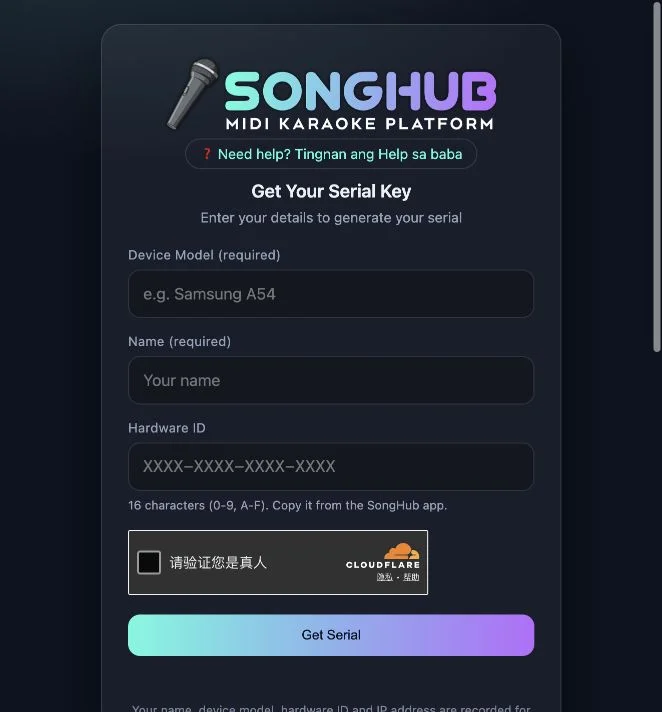
Phone serial or TV license file?
| Route | Device ID to use | Documented handoff |
|---|---|---|
| Phone / tablet | The target phone or tablet | Copy the serial back into that app’s activation screen |
| Android / Google TV | The target television | Transfer the downloaded .lic file and select it in the TV app |
These are the site’s documented instructions. Neither route was completed in our review.
Before you start
Have the SongHub app available on the device you want to activate. Open its activation screen and keep that device nearby while reading the web instructions. This tutorial explains the supplied activation page; it does not provide an app installer or generate a license on this website.
Inputs and a device-bound result
The visible fields request Device Model, Name and Hardware ID. The helper describes an identifier containing sixteen characters from 0–9 and A–F. The help explains that the result works only for the same Hardware ID. These requirements make the target device a more important distinction than the browser used to fill out the form. We did not test validation rules or submit identifiers.
Two delivery paths, one target device
The phone/tablet instructions describe copying a serial back into the app. The TV instructions describe moving a .lic file and selecting it on the television. A file is a different delivery mechanism, not evidence of a separate entitlement or a license that can be used on arbitrary devices. The help specifically distinguishes the TV’s ID from the phone that may be used to request its license.
What the television instructions actually establish
The TV tab describes obtaining a file named with the device ID and transferring it through USB or storage before selecting it in the app. We confirmed that selecting Android/Google TV displays that help panel. We did not download the file, inspect its format, import it into a television or test the app’s response. Those are separate checks from viewing documentation.
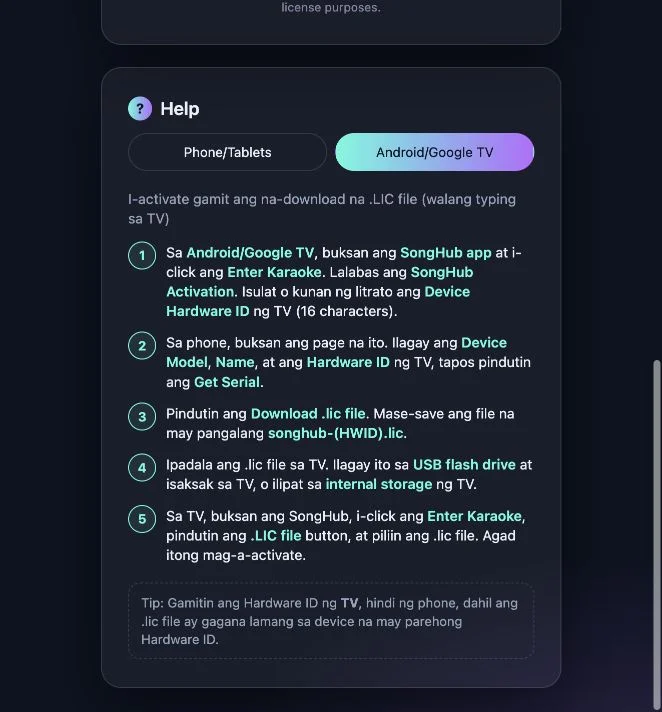
Data handling is visible; backend behavior remains unverified
The form’s notice says the name, device model, Hardware ID and IP address are recorded for license purposes. The browser also displayed a Cloudflare verification widget. These observations describe the interface we saw. They do not establish data retention periods, operator identity, server-side security controls or an independently audited privacy policy. No form data or verification challenge was submitted in our review.
How to assess an activation problem
Separate a field-entry problem from a license or app-version issue. First confirm the identifier came from the intended device and compare the documented route with the controls in your app. A successful website response, if you obtain one, still needs to be accepted by that app. We did not verify a recovery process for changed hardware, rejected licenses or transferred installations.
Check the current instructions before activating
Compare the current controls in your app with the steps on the activation website. Read the relevant access terms to understand whether this route matches your installation. The public form can be inspected without completing a request; eligibility and any payment conditions need confirmation with the provider.
Prepare for the documented activation flow
- Confirm that your existing app uses the supplied activation destination.
- Read the field labels and obtain the target device’s Hardware ID from the app.
- Review the licensing data notice before any submission.
- Choose the serial-entry or TV license-file instructions for your device.
- Treat successful app activation as a separate outcome from merely viewing the form.
Who this tutorial is for
Readers evaluating a device-bound activation utility and people comparing its phone and television setup paths.
What our check establishes
Tested scope: public form, visible verification widget, field helper, data notice and TV help-tab selection. Serial generation, clipboard results, license downloads, server behavior and in-app activation were not tested.
SongHub activation FAQ
What is the SongHub activation page?
It is the public Get Serial page at songhub-activation.pages.dev. It documents a licensing workflow for an existing SongHub karaoke app; it is not a browser karaoke player.
What information does the form request?
The visible fields are Device Model, Name and Hardware ID. The Hardware ID helper describes sixteen hexadecimal characters, using 0–9 and A–F.
Where do I get the Hardware ID?
The page’s help directs users to the SongHub app’s activation screen. Copy or record the identifier from the device you actually want to activate.
Which ID should I use for Android or Google TV?
Use the television’s Hardware ID, even if a phone is used to open the request page or move the file. The help says the license works only with the matching device ID.
What is the .lic option?
It is the documented TV activation route: obtain the license file from the page, transfer it to the TV and select it in the app. We inspected the instructions, not a generated file or successful import.
Does the page record submitted details?
Its visible notice says that the name, device model, Hardware ID and IP address are recorded for license purposes. We did not audit storage, retention or backend handling.
Is activation free?
Current pricing, eligibility and full license terms were not established by our interface review. The presence of a public form does not by itself confirm that every app installation is entitled to a free license.
Did you generate a serial or activate the app?
No. We inspected the public form and help tabs without submitting personal or device details, completing verification, generating a serial, downloading a license or activating an app.
Source and review scope
SongHub Karaoke — Get Serial ↗ is the supplied activation destination. Its Help section contains Phone/Tablets and Android/Google TV instructions, mainly in Filipino with English interface labels. We inspected the public form and selected the TV help tab on October 20, 2026. We did not submit details, complete the verification widget, generate a serial, download a license or activate an app. Screenshots show the actual public interface with empty fields.